


Brightside Health
4.0917.00 Reviews
App Specs
- Version
- 17.92.0
- Updated On
- License
- Free
- Downloads
- 50,000+
- Developer
- Brightside Health Inc
- Categories
- Medical
- Platform
- Android
Screenshots
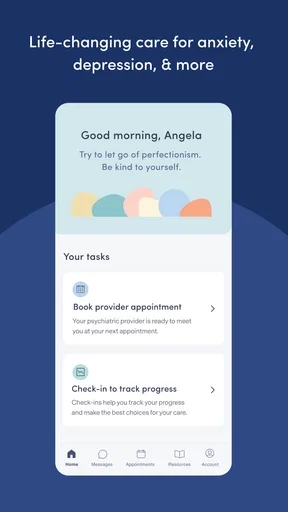
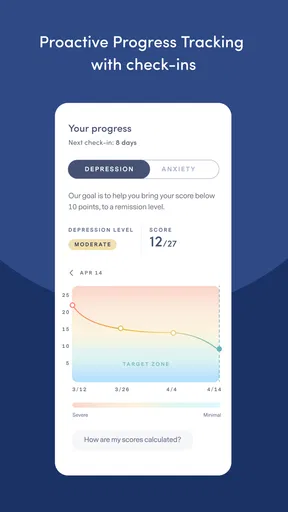
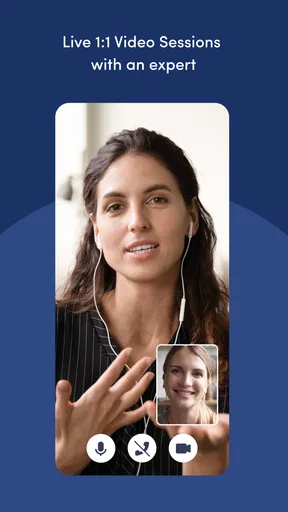
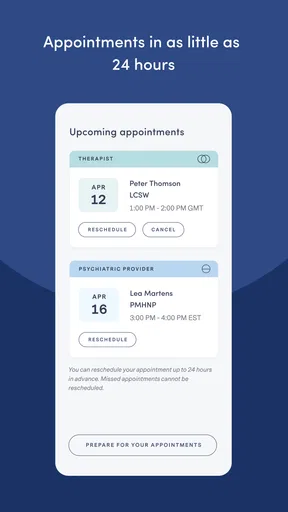

 Analysis by AppCompare
Brightside Health is a free medical app from Brightside Health Inc that brings virtual mental health care to a phone. I approached it less like a general wellness tracker and more like a digital doorway to professional support. That distinction matters: the app’s value depends on how easily it helps you begin and continue care, not on how many distractions or self-help extras it can offer.
My overall impression is that it makes the most sense for someone who wants mental health support without starting with an in-person clinic visit. It is also a practical option for people who prefer handling appointments and care-related tasks from a phone. At the same time, it is not a substitute for emergency help, and it will not be the right fit for someone who wants a fully self-guided meditation or mood-journaling app.
What using Brightside Health feels like in everyday life
The app sits in the medical category, so I would judge it by a different standard from a typical lifestyle download. A mental health app needs to feel calm, understandable, and dependable when the person using it may already be tired, worried, or having trouble concentrating. Brightside Health’s strongest idea is convenience: support can begin in a familiar device rather than requiring a separate desktop workflow or a trip across town.
A realistic use case would be someone finishing work, noticing that anxiety has been affecting sleep and concentration, and deciding to explore professional help that evening. A phone-based service can remove some of the friction involved in making that first move. I would still set aside enough time to read each prompt carefully rather than rushing through an assessment while distracted. In mental health care, speed at the start is useful, but thoughtful answers are more valuable than completing everything as quickly as possible.
The app is free to install, which makes trying the service less intimidating. That should not be confused with every aspect of care necessarily being free; medical services can involve their own arrangements, so I would review the details shown during the sign-up process before making assumptions. The app itself is aimed at everyone, but the suitability of a virtual care service depends much more on a person’s needs than on the age label shown in an app store.
Brightside Health has an average rating of 4.0 from around 2.6 thousand ratings, with more than 900 written reviews. I read that as a reasonably positive but not flawless public response. It suggests that many people find the service useful while leaving room for very different experiences depending on expectations, clinical needs, and how comfortable each person is with remote care.
How quickly it should feel on a phone
From a performance point of view, this is not an app where raw speed is the main attraction. The important moments are opening the service, moving through care-related screens, and reaching the information or appointment step you need without unnecessary confusion. A lightweight, focused medical app should feel more manageable than a crowded social platform, especially on a phone that is not new.
Worth Reading Before You Choose

EA SPORTS FC Mobile 26 Is a Bigger Football Game, but It Takes Time

Flipboard Shows What News Apps Must Do Beyond the Feed

Switching to Android Auto Means Rethinking Your Driving Routine

Google Calendar Makes a Crowded Week Easier to Manage

Ludo King Makes the Most of the Minutes Between Plans

Baby Panda World Brings Quick Play to Modern Phones, but Its Game Library Feels Busy
I would expect ordinary navigation to be more important than visual effects or constant background activity. That generally makes this kind of app easier to live with than entertainment-heavy software, but the experience can still feel slow if a screen depends on network communication or if a care workflow asks for several decisions in sequence. When that happens, the delay is more frustrating because the user may already be nervous about seeking help.
My practical advice is to open Brightside Health when you have a stable connection and a few uninterrupted minutes. If you are attempting an assessment between meetings, on public transport, or while your phone is switching between weak signals, the experience may feel more stressful than it needs to. A quiet setting also helps you answer sensitive questions honestly instead of treating the process like a quick form.
What happens during heavier use
The demanding part of this app is unlikely to be graphics or media playback. The heavier moments are more likely to come from completing an intake, reviewing care information, preparing for a virtual interaction, or moving through several account-related screens in one sitting. Those tasks are mentally demanding even when they are not demanding for the processor.
That difference is easy to overlook. A phone may remain cool and responsive while the user still feels overwhelmed by the amount of information involved. I found it helpful to treat the process as a series of small steps: keep relevant questions in mind, pause when an answer needs thought, and avoid starting a care workflow when you know you will have to abandon it halfway through.
For someone with limited storage, Brightside Health is more sensible than keeping several large wellness applications installed at once. Its purpose is narrower, and there is no obvious reason to expect the kind of resource burden associated with games or video editors. Still, I would keep the operating system and the app current, because medical-service software benefits from receiving compatibility and stability updates rather than being left untouched for months.
The current version is 17.89.1, and the app supports Android 7.0 or later. That broad Android compatibility is useful for people who do not own a recent flagship phone. However, an older supported operating system does not guarantee that every old device will feel equally comfortable. Screen size, available storage, battery condition, and the phone’s general responsiveness can all affect how easy it is to complete a detailed care workflow.
Reliability matters more than visual polish
For Brightside Health, reliability means more than whether the app opens. I would want it to preserve progress sensibly, present care information clearly, and make it obvious what action comes next. If a person has to repeat a sensitive explanation because a session failed or a screen was unclear, that creates a real emotional cost even if the technical problem is small.
I would therefore use the app in a deliberate way. Before beginning an important step, I would close unrelated apps, make sure the phone has enough battery, and use a dependable connection. These are ordinary precautions, but they are particularly worthwhile when the task involves private health information or a scheduled interaction. If something appears not to load, I would avoid tapping repeatedly and instead give the screen a moment before trying again.
Another useful habit is to keep personal expectations realistic. A virtual care app can organize access to support, but it cannot make every clinical question simple or every response immediate. People who need urgent assistance should use appropriate emergency services rather than waiting for an app-based process. Brightside Health is better understood as part of an ongoing care route, not as a crisis button.
The developer, Brightside Health Inc, gives the product a clear identity as a service connected to mental health care rather than a generic mood diary. That makes it more relevant to someone actively looking for professional support. It also means I would pay close attention to the privacy and care information shown inside the service before entering anything sensitive, just as I would with any medical platform.
Device limits and the right setting
A phone is convenient, but it is not always the best screen for a serious conversation. If you are using Brightside Health for a virtual appointment or another focused care task, a larger screen may be more comfortable when available, while headphones and a private room can make the experience easier to manage. The phone’s portability is a strength when access matters, but portability can become a weakness if it encourages you to handle an important session in a noisy or exposed place.
Older Android devices may also create practical friction even though Android 7.0 is the minimum operating system. Limited memory can make switching between the app and another service awkward. A small display can make longer explanations tiring to read. An aging battery can add unnecessary pressure if you are preparing for a scheduled interaction. None of these issues makes the app unsuitable by itself, but they are good reasons to test the basic workflow before relying on the phone for an important appointment.
I would not install it on a shared phone unless I was comfortable with the device’s account and privacy setup. Mental health information deserves the same care as other medical information. Using a personal device, locking the screen, and avoiding public Wi-Fi for sensitive steps are sensible choices, even though they are not unique to this service.
Brightside Health is also not the best choice for every type of user. If you only want breathing timers, daily affirmations, or a private journal with no clinical pathway, a simpler wellness app may feel faster and less involved. If you already have a trusted local clinician and prefer face-to-face appointments, this app may add convenience without replacing the relationship you value. And if your situation requires immediate, in-person assessment, a virtual app should not delay contacting the appropriate local service.
How it compares with familiar alternatives
The usual alternatives fall into several groups. Traditional in-person care offers physical presence and may be preferable when a clinician needs to observe something directly or when privacy at home is difficult. General telehealth platforms can be convenient, but they may cover many medical areas rather than focusing specifically on mental health. Self-help apps are often quicker to open and easier to use casually, yet they do not serve the same purpose as a route toward professional care.
Brightside Health’s trade-off is clear to me: it offers a more care-oriented experience than a basic mood tracker, but that also means more responsibility and more steps than a casual wellness download. I would choose it when the goal is to explore structured mental health support from a phone. I would choose a simpler app when I already know I only want a short, self-directed exercise.
That distinction can prevent disappointment. Someone downloading it expecting an endlessly customizable relaxation toolkit may decide it feels too clinical. Someone who has been postponing care because appointments seem difficult to arrange may find the virtual format much more approachable. The app’s usefulness depends on which of those two needs is closer to your own.
Small workflow choices that improve the experience
One non-obvious strength of a focused care app is that it can become a single starting point instead of another scattered collection of notes, reminders, and browser tabs. I would keep Brightside Health in an easy-to-reach folder and use it at a consistent time when possible. That does not turn the app into treatment by itself, but it reduces the chance that care-related tasks disappear among ordinary notifications.
A second practical tip is to separate preparation from the appointment or care step itself. Before opening the app, I would write down the main changes I have noticed, questions I do not want to forget, and any problems that have affected sleep, work, or daily routines. A short private note can help when anxiety makes it difficult to remember details. I would not use that note as a replacement for the app’s own questions; I would use it to communicate more clearly.
A third trade-off concerns convenience and attention. Because the service is on a phone, it is tempting to check it while multitasking. I think that is the wrong approach for sensitive care. Turning off unrelated notifications for a short period, finding a private place, and allowing time to read carefully can make the same workflow feel much more respectful and manageable.
Finally, I would judge the app after completing enough of the intended process to understand its rhythm, not after the first few seconds. A medical service can feel less instantly entertaining than a consumer app while still being more useful over time. The relevant question is whether it helps you take the next appropriate step without adding confusion.
My performance verdict
Brightside Health is a focused virtual mental health care app rather than a general wellness companion. In my experience, its performance should be judged by calm navigation, dependable access, and how little technical friction stands between a user and care-related action. It is not resource-intensive in the way a game or streaming app can be, but network quality, device age, privacy, and the emotional weight of the workflow all matter.
The app has passed fifty thousand installs, and its free entry point makes it easy to consider. I like that it supports people who may find a phone-based beginning less intimidating than a traditional first visit. I also appreciate that its purpose is specific enough to avoid the vague feeling of many wellness tools.
My reservations are equally practical. Virtual care is not ideal for every clinical situation, and a phone can be an awkward place for a serious conversation if the surroundings are noisy or shared. The experience may also feel slower than a simple self-help app because meaningful care requires questions, context, and attention. Those are not flaws to hide; they are part of the trade-off.
Overall, I would recommend Brightside Health to someone actively looking for accessible virtual mental health support and willing to give the process a private, uninterrupted setting. I would not recommend it as an emergency solution or as a replacement for every form of professional care. If that boundary is clear, the app is a sensible, approachable way to explore support from an Android phone, and its focused design is more valuable than a long list of unrelated wellness features.
Pros
- Licensed clinicians offer therapy and medication management online.
- Personalized treatment plans can address anxiety and depression.
- Appointments are available from the comfort of home.
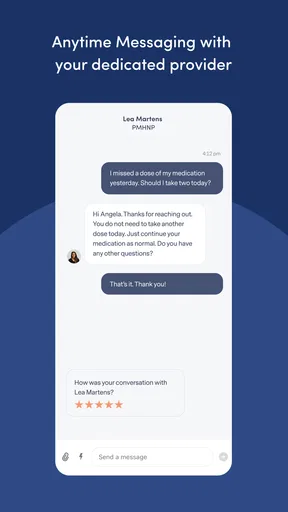
- The platform supports ongoing communication with your care team.
- Insurance may help reduce the cost for eligible members.
Cons
- Availability depends on your state and local provider coverage.
- Not suitable for emergencies or immediate crisis support.
- Some services may require insurance or have significant out-of-pocket costs.
- Provider matching may take time or require adjustments.
- Medication options are limited by clinical suitability and state rules.
FAQs for Brightside Health
What is Brightside Health, and what services does it provide?
Brightside Health is an online mental health platform that connects users with licensed professionals through digital care. Depending on the plan and availability, it may provide therapy, psychiatry, medication management, or combined treatment for conditions such as anxiety and depression. The service is designed for remote care, so appointments, assessments, messaging, and treatment follow-up are generally handled through the app or website rather than at a traditional clinic.
Is Brightside Health suitable for emergencies or serious mental health crises?
Brightside Health should not be treated as a replacement for emergency services. The platform is intended for scheduled mental health care and may not be appropriate for someone experiencing an immediate danger, a severe crisis, or thoughts of harming themselves or others. In an emergency, contact local emergency services or a crisis hotline immediately. Before subscribing, review Brightside’s eligibility information and confirm that its available level of care matches your needs.
How do appointments and communication with providers work?
After completing the initial intake process, Brightside Health typically matches users with a qualified provider based on their needs, location, and selected service. Therapy and psychiatry appointments are conducted remotely, while communication options may include video visits, secure messaging, questionnaires, and treatment check-ins. Availability, response times, appointment frequency, and provider-matching options can vary, so users should check the current plan details before starting care.
Does Brightside Health prescribe medication, and how much does treatment cost?
Brightside Health may offer psychiatric evaluation and medication management through licensed medical providers, but prescriptions depend on the clinician’s assessment, medical history, location, and applicable regulations. Not every medication or treatment is available to every user. Pricing also varies according to the selected plan, insurance coverage, promotions, and whether therapy, psychiatry, or both are included. Confirm the total cost, renewal terms, and pharmacy expenses before enrolling.
What privacy and account requirements should users consider before downloading Brightside Health?
Because Brightside Health handles sensitive medical and mental health information, users should review its privacy policy, consent forms, and terms of service before creating an account. You will generally need to provide personal, health, and payment details during registration, and some features may require identity or insurance information. Use a private device and secure connection when accessing appointments or messages, and remember that app availability and features may differ by country or state.


